Qt Quick hates me
August 17, 2012
I haven’t blogged since a while, because I do not do much KDE hacking lately, but today I’ve got around to playing with QML again.
The goal was to build something like a breadcrumb navigation widget, where the current directory is indicated by its name being written in a larger font. Here’s what I arrived at after a few minutes:
import QtQuick 1.1

Rectangle {
    width: 800
    height: 100
    color: "black"

    Row {
        anchors.horizontalCenter: parent.horizontalCenter
        anchors.top: parent.top
        spacing: 10

        Repeater {
            id: repeater
            property int currentIndex: 4
            model: ["/home", "/username", "/some", "/pseudo", "/path"]

            Text {
                text: modelData
                font.pixelSize: index == repeater.currentIndex ? 40 : 20
                color: "white"
            }
        }
    }
}

Close enough. Just adjust that alignment:
...
Text {
    ...
    height: 60
    verticalAlignment: Text.AlignBottom
}
...

Gah! Can you see it? The baselines are misaligned. Usually, you lay out text such that all letters “sit” on an even line (the baseline).
The documentation does not mention any type baseline alignment in a Row element (or any type of vertical alignment in a Row element, for that matter).
I then tried to hack around this problem by dropping the Row element and laying out the Text elements manually, but the elements in the repeater won’t anchor to each other. That’s probably a problem with the elements not being fully initialized when the anchor property is evaluated, but at this point I give up.
This has been my second experience with Quick. When I tried it for the first time, my goal was a Quick version of the Planarity game. I got stuck when I noticed that Qt Quick 1 does not have any kind of line or ellipse primitive (only rectangles and images). Really?!?
So, while I understand very well and appreciate the idea behind Qt Quick, I have come to the conclusion that Qt Quick hates me. Or I have a talent of hitting a roadblock within ten minutes, regardless of the general direction.
P. S. Turns out the WordPress WYSIWYG editor hates me, too. (Well, either me or the combination of <pre> and images.)
Trick question
May 15, 2012
I just came up with a trick question. Let’s see if you can solve it.
Why will 20 become smaller when you add another zero?
Update: Commenters have been very creative. My original solution was to add the zero at the front, yielding “020”, which is 16 in many programming languages. Other solutions are “20^0 = 1” include “0.20”.
Is anyone using custom mouse actions in Palapeli?
February 13, 2012
Another inquiry post. I’m thinking about removing the custom mouse interaction code in Palapeli. The situation is that whereas most applications hardcode what certain mouse buttons do (e.g. left button = click, right button = context menu), Palapeli allows the user to configure which mouse button (or wheel) does what. For reference, this is the default configuration:
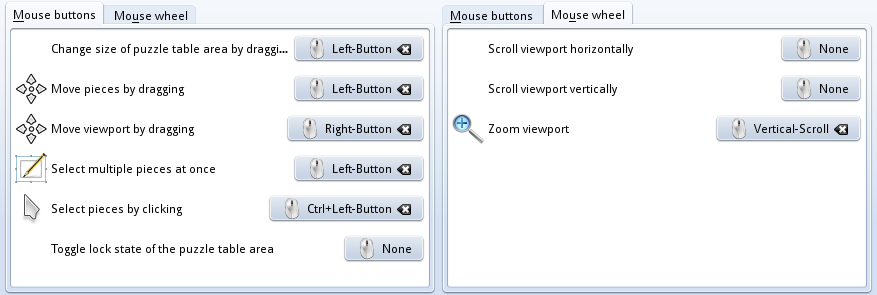
Problem is that the code behind these mouse button associations is awkwardly complex.¹ I plan to remove this mess and replace it with a sane default configuration because I feel it’s just adding clutter without providing much added value.
So if you want me to keep this code, please write back. Besides that, I also accept recommendations for a better default configuration.
¹ In numbers: 1127 LOC where the whole application is about 6000 LOC.
Any users of libkdegames?
January 31, 2012
Since we’re thinking about updating libkdegames, I was just wondering if any developer outside kdegames uses libkdegames. If you are or know such a developer, please write a comment.
While I like openSUSE’s approach of ordering extra packages into addon repositories on their Build Service, I hate those ugly repository URLs. GUI users may just use the one-click install links on the package search, but command-line enthusiasts are out of luck.
To solve the problem, I’ve written two small Python scripts. obs-addrepo wraps zypper addrepo for Build Service repos:
# before
$ sudo zypper addrepo http://download.opensuse.org/repositories/Application:/Geo/openSUSE_12.1/ Application:Geo
# after
$ sudo obs-addrepo Application:Geo
obs-quickinstall is the 1-click installer for command-line users:
# before
$ sudo zypper addrepo http://download.opensuse.org/repositories/Application:/Geo/openSUSE_12.1/ temp
$ sudo zypper refresh temp
$ sudo zypper install --from temp josm
$ sudo zypper removerepo temp
# after
$ sudo obs-quickinstall Application:Geo josm
Both tools are now available as the obs-tools package (Git repo). Packages are currently building on the Build Service, the project page has installation instructions.
Bug of the day: How ConfigParser ruined my calculations
December 7, 2011
For my thesis, I have implemented a series of numerical applications. The core application (written in C++) uses simple INI-like configuration files for reading system parameters. For example:
[system]

name=example2

r1=1.0

r2=1.5

V1=-0.05

V2=0.1

[...]
Nothing exciting there, reading this is a breeze with QSettings. Now I needed to do some symbolic calculations, for which I chose Python and the excellent SymPy module. To read the system configuration, I chose the standard ConfigParser module.
parser = ConfigParser.RawConfigParser()

parser.read("scatttd.conf")

sysType = parser.get("system", "name")

# read system parameters

sysParams = dict()

for key, value in parser.items("system"):

    if value != "name":

        sysParams[key] = float(value)
That reads the “system/name” key, and puts all other keys (which are assumed to be floats) into a dictionary, so the system-specific code does not need to deal with the ConfigParser object.
r1, r2 = params.get("r1", 1.0), params.get("r2", 1.0)

V1, V2 = params.get("V1", -0.1), params.get("V2", +0.1)
This code gets the parameters in the system-specific code. Nothing exciting here. Except, stuff doesn’t work. The results of the following calculations suddenly don’t match my expectations (or the predictions made by my other programs).
Since the code after the snippet above is about 30 lines of SymPy magic (accumulating expressions that print dozens of lines onto my terminal), I suspected that some error occurred there. After about two days of searching for the problem there, and calculating everything by hand, something occurred to me when I looked at the debug output:
DEBUG V1 = -0.1
Didn’t the configuration file say “V1=-0.05”? Let’s have a look at the parameter dict:
{'v1': -0.05, 'v2': 0.1, 'r1': 1.0, 'r2': 1.5}
See the problem? “v1” has a lower-case “v”, so params.get("V1", -0.1) fails and returns the default value (-0.1). One glimpse at the documentation says that
parser.optionxform = str
solves the problem. Gah!
Lost for words
November 4, 2011
commit 740673c11aee9762987e3a205443ce1dec11aee8
Author: Stefan Majewsky <majewsky@gmx.net>
Date:   Sat Nov 5 00:11:37 2011 +0100

    lolwut?

diff --git a/tagaro/interface/board.cpp b/tagaro/interface/board.cpp
index 199c007..17dbdfc 100644
--- a/tagaro/interface/board.cpp
+++ b/tagaro/interface/board.cpp
@@ -42,7 +42,6 @@ Tagaro::Board::~Board()

 Tagaro::Board::Private::~Private()
 {
-       QList<Tagaro::SpriteObjectItem*> m_items;
        for(QList<Tagaro::SpriteObjectItem*>::const_iterator a = m_items.constBegin(); a != m_items.constEnd(); ++a)
                (*a)->d->unsetBoard();
 }
Introducing the Raven Music Server
October 10, 2011
While I was on my quest of reducing the memory footprint of a freshly launched KDE session, I found that the process which uses most memory just after startup is Amarok, which contributes over 80 MiB to 300 MiB total RAM usage. Now of course, Amarok has its reasons for a high memory usage: For example, its collection is backed by a MySQL/Embedded database. This memory footprint is justified by the plethora of features Amarok offers. But still, 80 MiB RAM usage is quite a lot when all I want to do (99% of the time) is to listen to some music files on the local disk. (My collection has 818 tracks at this very moment.)
Can we improve on that?
Looking at my desktop, I see the “Now Playing” applet. It shows the current track from Amarok, and has the basic media player controls (pause/stop/previous/next + seek slider + volume slider). Again, this is about all I need for an user interface while my playlist is filled. I remember that the nowplaying applet communicates with Amarok via DBus using the MPRIS (Media Player Remote Interface Specification) standard.
With all these impressions in mind, my target is clear: I want a headless media player which runs in the background and offers an MPRIS-compliant control interface on DBus. Something with a smaller memory footprint.

Intensive searches on the internet did not turn up anything of interest. Of course there are command-line music players (e.g. MPlayer), but those expect to be connected to a terminal for control. They cannot be run in the background, and there’s no nice GUI for them (like with the nowplaying applet). It looks like I need to do it myself yet again.
So here is the Raven Music Server (called ravend for short, as it is a daemon), which is now publicly available at git://anongit.kde.org/scratch/majewsky/raven. It currently implements the basic interfaces mandated by MPRIS version 2 (unfortunately the “Now Playing” applet supports MPRIS 1 only). The biggest missing piece is support for editing the track list, so at the moment you need to restart the process to change the playlist.
I have been productively using ravend for two weeks now, since one day after its inception, and I’m quite satisfied with it. And now that it is in a public Git repo, you can, too! Provided that you find pleasure in controlling your mediaplayer with commands like
qdbus org.mpris.MediaPlayer2.ravend /org/mpris/MediaPlayer2 org.mpris.MediaPlayer2.Player.PlayPause
Convenient user interfaces will become available, eventually. Even then, the Raven Music Server will probably not be interesting for end users. Power users may find this project interesting if they like to keep an eye on their system’s memory footprint, or want to have their playback continue even when the X server is terminated, or want to run a full-fledged media player on a headless system.
Reducing the memory footprint of Akonadi
October 10, 2011
I have some systems where I don’t use Kontact or anything else that makes use of Akonadi, so my Akonadi database is empty. Still I find the Akonadi server and its numerous agents running when I have just started my session.
The Akonadi server is only started when some application needs it. So who wants to communicate with Akonadi? After some search, I found that the clock applet on the Plasma panel is the culprit. It has a feature to display events from the Akonadi calendar which is enabled by default (and I don’t want to oppose this choice; it’s a very nice integration feature for people using KOrganizer).
So if you want to prevent the Akonadi server from starting on systems where you don’t use Akonadi, or just want to speed up the startup of your KDE session by delaying Akonadi’s startup until it’s actually needed, do the following: Go to the configuration of the clock applet, and disable “Display Events” in the “Calendar” section.
To check whether Akonadi is running, open the “System Activity” monitor with Ctrl+Esc (or by clicking on the second icon from the left in KRunner). Look for a process called “akonadiserver”. (There will also be multiple processes with names like “akonadi_agent_launcher” or “akonadi_whatever_resource”.) You can also manually start and stop Akonadi with the commands “akonadictl start” and “akonadictl stop” (from either the command line or KRunner).
$ echo “A clear sign of madness”
September 13, 2011
What’s a clear sign that I’m a command-line addict? Not only do I have a custom prompt. My prompt is generated by a Python program, which has already grown to over 200 lines. My prompt detects Git and SVN repos, my custom build directory hierarchy, deleted directories at or above $PWD, common usernames and hostnames, shell type and shell level; and it’s still missing some features. What do you think: Is this madness? Does anyone else here use fully custom prompts?
 The Geek Shall Inherit The Earth